
DaVinci Resolve Studio for mac:
DaVinci Resolve Studio for mac is a professional all-in-one post-production application that combines advanced video editing, cinematic color grading, visual effects, and professional audio production within a single workflow. It is widely used by filmmakers, broadcasters, content creators, and post-production teams for high-end projects ranging from social media content to Hollywood feature films.
The software allows seamless switching between editing, color, visual effects, and audio pages, enabling faster workflows without the need to move between multiple applications. DaVinci Resolve Studio also supports real-time multi-user collaboration, allowing editors, colorists, VFX artists, and sound designers to work simultaneously on the same project.
Cut Page – High-Speed Editing:
The Cut Page is designed for fast-paced editing environments such as commercials, news, and online content. It features a simplified interface focused on speed and efficiency while still offering professional tools for importing media, trimming clips, adding transitions and titles, basic color matching, and audio adjustments. Users can switch between the Cut Page and the traditional Edit Page at any time during a project.
Professional Editing Tools:
DaVinci Resolve Studio for mac includes a high-performance editing engine optimized for smooth playback and fast rendering, even with demanding formats such as RAW and H.264. It supports both offline and online editing workflows and is suitable for short-form content as well as full-length productions.
Fusion Visual Effects:
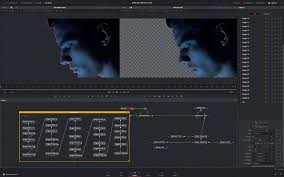
The built-in Fusion page offers a powerful node-based compositing system with hundreds of tools for 2D and 3D visual effects. Users can create professional-quality motion graphics, compositing, and visual effects directly inside DaVinci Resolve without relying on external software.
Advanced Color Grading:
DaVinci Resolve is known for its industry-leading color grading capabilities. It provides advanced primary and secondary color tools, curves, tracking, stabilization, and HDR grading options. Its high-precision image processing makes it a preferred choice for professional colorists worldwide.
Fairlight Audio Post-Production:
The Fairlight page transforms DaVinci Resolve Studio into a full digital audio workstation. It includes professional mixing tools, EQ, dynamics processing, ADR tools, sound libraries, sample-level editing, and support for advanced audio plugins.
AI-Powered DaVinci Neural Engine:
The DaVinci Neural Engine uses artificial intelligence to automate complex tasks such as facial recognition, intelligent upscaling, advanced retiming, automatic color matching, and smart organization of media files. It is optimized for modern GPUs and works across supported platforms.
ResolveFX & Studio-Only Features:
DaVinci Resolve Studio includes exclusive visual and audio effects such as film grain, advanced noise reduction, motion blur, HDR tools, object removal, stylization effects, and immersive 3D audio support. These tools expand creative flexibility for professional workflows.
Blackmagic RAW Support:
Blackmagic RAW is a high-performance codec designed for quality and efficiency. It delivers the flexibility of RAW video with manageable file sizes and fast playback performance, making it ideal for professional post-production.
Professional Hardware Support:
DaVinci Resolve Studio supports dedicated color grading panels and Fairlight audio consoles, providing tactile control for faster and more precise adjustments in professional studio environments.
Missing / Commonly Required Product Data:
Software Name: DaVinci Resolve Studio
Developer / Publisher: Blackmagic Design
Software Type: Professional Video Editing & Post-Production Software
License Type: One-time purchase (Lifetime license, no subscription)
Activation: License key or hardware dongle (varies by purchase)
Supported Operating Systems:
-
Windows (64-bit)
-
macOS
-
Linux
Maximum Supported Resolution:
-
Up to 8K and higher (hardware dependent)
Maximum Frame Rate:
-
Up to 120 FPS
Languages Supported:
-
English
-
Portuguese
-
French
-
Spanish
-
Chinese
-
Japanese
-
Russian
Intended Users:
-
Video editors
-
Filmmakers
-
Colorists
-
VFX artists
-
Audio professionals
-
Content creators
Internet Requirement:
-
Required for activation and updates
-
Offline use supported after activation
What’s New (Version 20.3)?
-
Release notes not available at time of listing update
Leave a Reply