
Boxy SVG for mac:
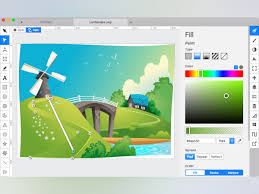
Boxy SVG for mac aims to provide a powerful yet approachable SVG editor that serves non-technical users, professional designers, and web developers in a single workflow.
SVG (Scalable Vector Graphics) is the standard format for vector-based artwork such as icons, illustrations, charts, banners, and interface assets. Boxy SVG focuses on making SVG creation, editing, and production-ready output simple, precise, and efficient.
Target Users:
-
Non-technical users:
-
Create and edit icons, banners, and simple illustrations
-
Modify templates without learning complex design software
-
-
Designers:
-
Perform precise vector editing and layout work
-
Manage typography, paths, layers, and reusable components
-
-
Web developers:
-
Edit and inspect SVG and CSS directly
-
Produce clean, maintainable SVG code for production use
-
Core Features:
-
Familiar, productivity-focused interface based on widely used vector-editing patterns
-
Real-time, on-canvas editing of:
-
Object geometry
-
Transforms
-
Fills, strokes, gradients, and effects
-
-
Save files in SVG and SVGZ formats
-
Export to PNG, JPG, WebP, PDF, and HTML
-
Integrated stock vector browser with clearly licensed free artwork
-
Font browser with live preview and easy font application
-
Fully configurable keyboard shortcuts for 100+ commands
-
Manual guides, smart snapping guides, and customizable grid
-
Comprehensive path tools:
-
Unite, intersect, subtract, exclude
-
Open/close paths, reverse direction, simplify
-
-
Object arrangement tools:
-
Align, distribute, rotate, flip
-
Layer ordering, grouping, and locking
-
Document & Editing Tools:
-
Layer and object panel with visibility and lock controls
-
Artboards or pages within a single document
-
Symbols / reusable components
-
Shared styles for colors, strokes, and text
-
Undo/redo history with non-destructive editing
-
Numeric precision input with unit support (px, %, em, etc.)
Text & Typography:
-
Text editing with font size, weight, spacing, and alignment controls
-
Support for text on paths
-
Convert text to vector outlines when needed
-
Web-font usage that respects font licensing rules
For Web Developers:
-
High-fidelity, Chromium-based SVG rendering engine
-
Built-in SVG and CSS inspector with:
-
Element tree view
-
Attribute and style editing
-
-
Clean, production-ready SVG output with options to:
-
Preserve IDs, classes, titles, and accessibility tags
-
Remove editor-only metadata
-
-
SVG sprite workflow support:
-
Edit and manage symbols and
<defs> -
Safe export for icon systems and sprite sheets
-
Accessibility & Standards Support:
-
Keyboard-accessible interface
-
Support for SVG
<title>and<desc>elements -
ARIA and data-attribute editing
-
Standards-compliant SVG output
Performance & Compatibility:
-
Optimized for large and complex SVG files
-
Smooth pan and zoom with smart rendering
-
Best experience in Chromium-based browsers with graceful support for others
Leave a Reply