
Blackmagic Fusion for mac:
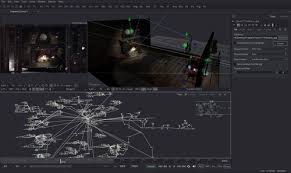
Blackmagic Fusion for mac is a high-end compositing and visual effects application designed for film, television, broadcast, motion graphics, and 3D production. It uses a node-based workflow that allows artists to build complex effects by visually connecting tools, making large and detailed projects easier to manage and modify.
With advanced compositing, 3D workspace support, GPU acceleration, and scalable rendering, Fusion is suitable for both independent artists and large studio pipelines. It is widely used for cinematic visuals, broadcast graphics, title sequences, and game cinematics.
Blackmagic Fusion for mac integrates compositing, motion graphics, and 3D rendering into a single environment, allowing artists to work efficiently without switching between multiple applications.
Key Features:
Node-Based Workflow:
Fusion uses a visual node system where effects and operations are connected logically. This approach makes complex scenes easier to organize, adjust, and expand compared to traditional layer-based timelines.
Advanced VFX Toolset:
Includes tools for keying, tracking, rotoscoping, painting, particles, animation, compositing, and image retouching, suitable for high-end production work.
True 3D Workspace:
Work with cameras, lights, geometry, and imported 3D models directly inside the compositor, blending 2D and 3D elements seamlessly.
GPU-Accelerated Performance:
Optimized for modern GPUs using Metal, CUDA, and OpenCL to deliver real-time feedback and smooth interaction, even with demanding scenes.
Virtual Reality & Stereoscopic Support:
Supports VR content creation and stereoscopic workflows, enabling immersive previews and high-frame-rate interaction.
Scalable Rendering:
Render projects locally or distribute jobs across multiple networked machines without additional licensing costs.
Supported Platforms:
-
Operating Systems: Windows, macOS, Linux
-
Versions: Fusion (free), Fusion Studio (paid)
Typical Use Cases:
-
Film & TV visual effects
-
Motion graphics & broadcast design
-
Title sequences & cinematic intros
-
Game cinematics
-
VR and stereoscopic content
-
High-end compositing pipelines
Target Users:
-
VFX Artists
-
Motion Graphics Designers
-
Broadcast Designers
-
Film & TV Studios
-
Game Cinematic Artists
File & Format Support:
-
Image sequences (EXR, PNG, TIFF, DPX, etc.)
-
Video formats (professional codecs)
-
3D formats (FBX, OBJ, Alembic)
-
Camera & tracking data
Collaboration Tools:
-
Shared asset bins
-
Shot versioning
-
Annotations and notes
-
Basic timeline playback and review
Licensing Model:
-
Fusion: Free version with core features
-
Fusion Studio: Paid license with advanced collaboration and studio tools
-
No per-node render licensing fees
Learning Curve:
-
Moderate to advanced
-
Best suited for professional workflows
-
Extensive documentation and training resources available
Leave a Reply