
Live Home 3D Pro for mac:
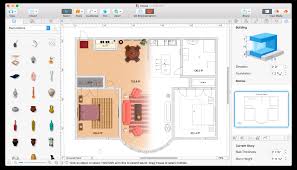
Live Home 3D Pro for mac is a professional home and interior design application created for homeowners, architects, and design professionals. It enables users to design accurate 2D floor plans and instantly visualize them in high-quality 3D. The Pro edition expands the standard feature set with advanced architectural tools, professional rendering options, and enhanced export capabilities.
Core Capabilities:
2D & 3D Design
-
Design precise 2D floor plans with real-time dimensional feedback
-
Automatic conversion of 2D layouts into fully interactive 3D models
-
Real-time 3D rendering with smooth navigation and walkthrough mode
-
Support for multi-story buildings with unlimited levels (Pro)
Floor Plan & Drafting Tools:
-
Create rooms quickly using intelligent room-drawing tools
-
Draw straight or curved walls with adjustable thickness and height
-
Elevation view for accurate vertical planning (Pro)
-
Dynamic measurement system with selectable units (metric & imperial)
-
Smart snapping, guides, and dimension controls for precise alignment
-
Automatic 2D vector outlines for furniture and objects
Visualization & Environment:
-
Real-time lighting adjustments directly in 3D view
-
Physically based lighting with geographic location and time-of-day simulation
-
Multiple camera setups including perspective and parallel projection (Pro)
-
Adjustable field of view and camera depth
-
Soft, realistic shadows using professional shadow-mapping techniques
-
Performance optimization through adjustable level-of-detail settings
Objects, Materials & Customization:
-
Extensive built-in library with thousands of furniture items and décor objects
-
Large collection of ready-to-use surface materials
-
Custom materials created from user-supplied images
-
Advanced material editor with real-world size scaling (Pro)
-
Support for importing third-party 3D models in common industry formats
-
Polygon-based construction tools for balconies, decks, porches, and platforms (Pro)
Roofs & Structural Elements:
-
Guided roof creation using customizable templates
-
Manual roof shaping for complex architectural designs (Pro)
-
Fully adjustable dormers and roof segments
-
Advanced window and opening creation, including corner windows
Export, Sharing & Presentation:
-
High-resolution image export suitable for print and presentations
-
Video walkthrough rendering, including ultra-high-definition output
-
Support for 360° panoramas and immersive video formats
-
Stereo and VR-ready export options (Pro)
-
Export full projects or selected elements to widely used 3D formats
-
Easy sharing via email, messaging apps, and cloud services
Supported Platforms:
-
macOS
-
Windows
-
iPadOS (feature set may vary by platform)
Typical Use Cases:
-
Residential home planning and renovation
-
Interior design and space visualization
-
Real estate presentations
-
Architectural concept development
-
Furniture layout and lighting simulation
System Requirements:
-
Modern multi-core CPU
-
Dedicated or integrated GPU with 3D acceleration support
-
Minimum 8 GB RAM recommended (16 GB for large projects)
-
Several GB of free disk space for assets and exports
Licensing & Edition Notes:
-
Available as a one-time purchase or platform-specific license
-
Pro features vary slightly by operating system
-
Commercial and professional use supported
-
No subscription required (platform dependent)
Support & Learning Resources:
-
Built-in help system and onboarding assistant
-
Step-by-step video tutorials for beginners and professionals
-
Sample projects and templates included
-
Access to technical support services
Leave a Reply