
OmniGraffle for mac:
OmniGraffle for mac 7 is a modern diagramming and illustration application designed for users who need clarity, precision, and flexibility. It introduces a refreshed interface, streamlined workflows, and advanced tools that support both simple sketches and complex technical diagrams.
The application is suitable for professionals and beginners alike, offering a balance between powerful features and ease of use.
What You Can Create:
OmniGraffle supports a wide range of visual projects, including:
-
Website and app wireframes
-
Flowcharts and process diagrams
-
Network and electrical layouts
-
Organizational charts and family trees
-
UML and software architecture diagrams
-
Infographics and visual planning documents
Whether you work in design, engineering, education, or business, the tool adapts to your needs.
Flexible Design Workflow:
Users can customize nearly every part of their workspace. Canvases, inspectors, templates, and stencils are all configurable, allowing you to work efficiently and consistently across projects. Built-in tools make alignment, spacing, and styling fast and accurate.
Enhanced Usability:
Instead of complex menus, OmniGraffle focuses on a clean interface where tools are logically grouped and easy to access. Common actions require fewer clicks, helping users stay focused on design rather than navigation.
Personalization and Productivity:
You can tailor OmniGraffle to your workflow by:
-
Creating reusable templates
-
Saving custom stencils
-
Adjusting inspectors to show only relevant controls
-
Reusing shared elements across multiple pages
This makes it a reliable daily tool for long-term projects.
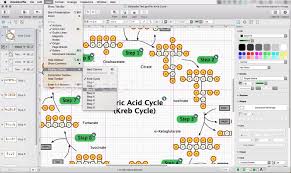
Advanced (Pro) Capabilities:
The Pro edition adds professional-grade functionality, including:
-
Visio compatibility: Open and edit Visio files, stencils, and templates, and export diagrams back to Visio-compatible formats
-
Shared layers: Maintain consistent headers, footers, legends, or branding across multiple canvases
-
Precise geometry controls: Define exact coordinates for shapes and individual points
-
Shape operations: Combine shapes using union, intersection, or subtraction, with the ability to separate them later
-
Scalable display settings: Choose how measurements relate to pixels or points for accurate output
-
Photoshop export: Send layered designs directly to Photoshop with preserved structure
-
Table-based layouts: Organize repeating elements into rows and columns that automatically adjust
Platform and File Support:
-
Operating systems: macOS and iPadOS
-
File formats: Native OmniGraffle files, PDF, PNG, SVG, Visio formats, and image exports
-
Use cases: Individual professionals, teams, educators, and enterprises
Leave a Reply